

How to Get a Mobile App for Your Driving School (Without Hiring a Developer)
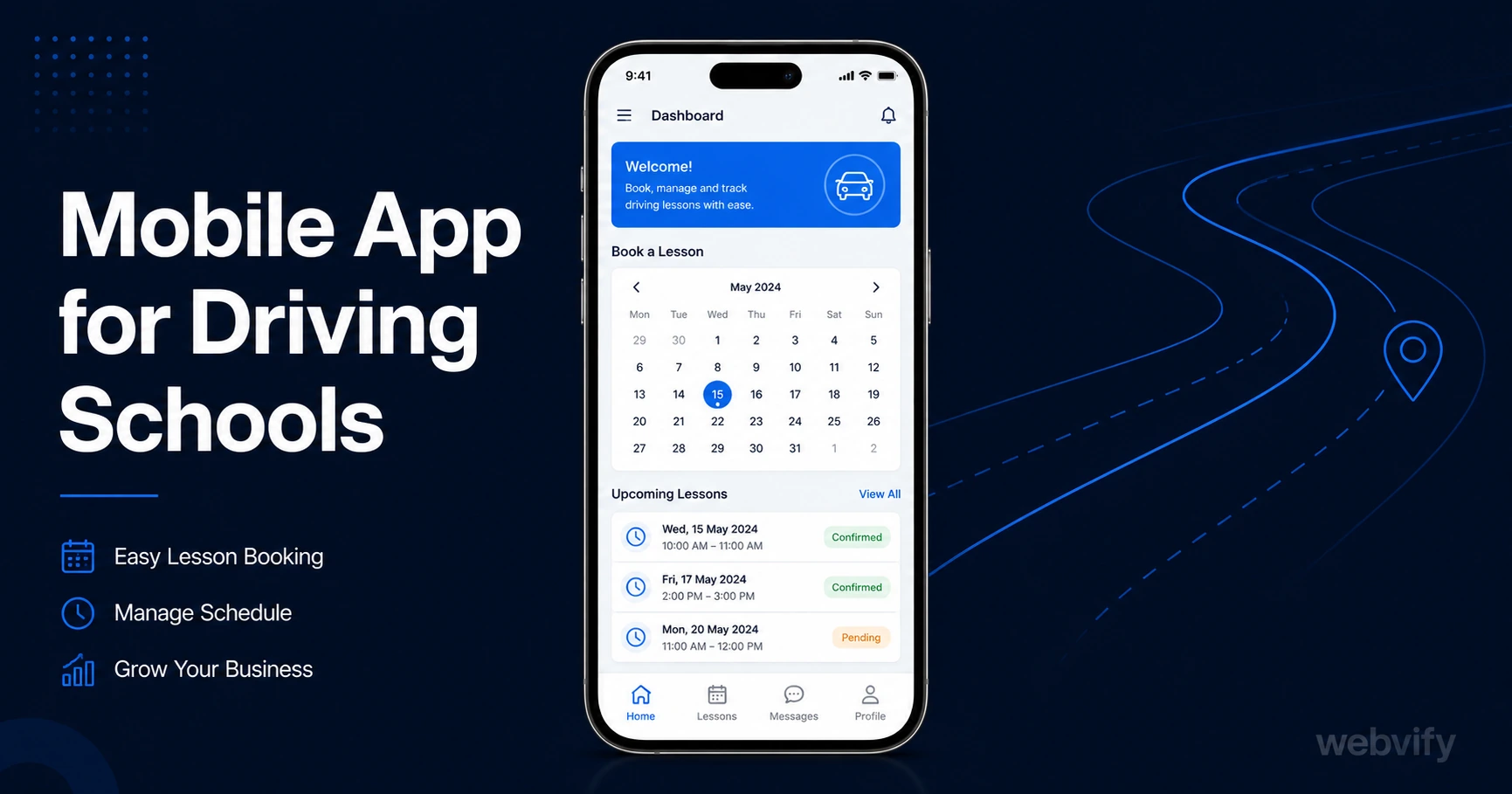
Driving students drift between lessons because nothing keeps them on schedule. Here's how a mobile app with push notifications fills the gap — no developer needed.
Inside this article
The average student needs 45 or more hours of practice before passing their driving test. Most driving schools lose them after the first two or three lessons — not because of poor instruction, but because nothing keeps them on schedule.
After each lesson, the student heads home with a vague plan to "book next week." Life gets in the way. The gap between lessons stretches from one week to three. Motivation drops. Eventually they stop booking entirely, and your instructor has empty slots they can't fill.
This is the driving school retention gap. It isn't a product problem — it's a visibility problem. A mobile app for driving schools addresses it directly.
Why Students Drift Between Lessons
Driving lessons don't have the built-in habit of a weekly yoga class or a gym membership. Students book on-demand, which means every rebooking requires conscious effort. If your school communicates through email, you're working against a 20–25% open rate. By the time a reminder lands in their inbox, they've already forgotten or moved on.
Push notifications change the dynamic entirely. Messages sent via a branded mobile app reach the lock screen directly — open rates run at 60–90%, compared to 20–25% for email. A single well-timed notification on Day 10 after the last lesson is enough to convert "I'll book sometime" into a confirmed appointment.
The other side of the gap is booking friction. If a student has to search for your website, log in, find your schedule, and fill out a form — they'll postpone it. When your app is already on their home screen, the booking is two taps away.
What a Mobile App for Driving Schools Actually Does
A branded driving school app isn't a custom build starting from zero. If your school already has a website — even a basic one with an online booking system — that site can be packaged as a mobile app and submitted to the App Store and Google Play.
This approach is called a WebView app. Your existing website runs inside a native app shell. Students see your booking page, your availability calendar, and your instructor profiles — all inside an app with your school's name and icon in the App Store.
The app delivers:
- Push notifications — send lesson reminders, slot openings, and test prep tips directly to the lock screen
- Home screen presence — your school's icon sits next to the apps students use every day, not buried in an email inbox
- App Store credibility — a listing on Apple and Google makes your school look established and trusted
- Rebooking shortcuts — returning students open the app and book in seconds, not minutes
Services like Webvify handle the end-to-end process: wrapping your existing website into a native app, submitting it to both stores, and giving you an admin panel to manage push notifications after launch — with no mobile development knowledge required.
The Push Notification Campaigns That Fill Your Lesson Calendar
Push notifications are most effective when timed to actual student behavior, not sent on a generic schedule. For driving schools, three campaigns deliver the highest return:
The 10-day rebooking nudge. Send a notification 10 days after the student's last lesson: "Ready to book your next session? We have slots open this week." Students who haven't rebooked within 10 days are already drifting. This message catches them before the gap becomes a habit.
The slot filler. When a cancellation opens up, push to students who are overdue for a lesson: "A slot just opened up tomorrow at 3pm. Book now before it fills." This turns last-minute cancellations into immediate revenue instead of empty hours.
The test prep countdown. For students who've booked their driving test, send a short sequence in the final two or three weeks: lesson reminders, hazard perception tips, and a "You've got this" message the day before the test. Students who pass on their first attempt tend to leave reviews — and reviews drive bookings from new students.
Getting Your Mobile App for Driving School on the App Store
The most common misconception about App Store submission is that it requires a developer. It doesn't — but it does require navigating Apple's developer portal and Google Play's compliance questionnaire, which can be confusing without guidance.
For driving schools, there are no major submission complications. Unlike e-commerce or membership sites, you're not selling digital content — you're taking bookings for a physical service. This means Apple's In-App Purchase rules (Guideline 3.1.1) don't apply. Payment flows handled through your website's booking system remain unaffected.
The two things to confirm before submission:
-
Your booking system works in a mobile browser. If the booking calendar doesn't display correctly on iOS Safari or Chrome for Android, it won't display correctly in the app. Test the booking flow on mobile before submitting.
-
You have a custom domain. Apple won't approve a WebView app pointing to a generic subdomain (for example, myschool.wixsite.com). Your site needs to be on its own domain (for example, myschool.com).
Once those are confirmed, the submission process typically takes 24–48 hours on Apple and 3–7 days on Google Play for the first review.
For a detailed walkthrough of what App Store submission looks like for service businesses, the appointment booking mobile app guide covers the process step by step — including what to expect during Apple's review.
Why Home Screen Presence Matters for Driving Schools
Most driving students are shopping around. They may have enquired with two or three schools before picking one. Once they've booked their first lesson with you, your goal is to become the obvious choice for the rest of their lessons — before a competitor or an aggregator platform fills that space.
A branded app on the student's home screen is real estate no competitor can take. Every time they reach for their phone, they see your school's name. When they're ready to book, they open your app — not a search engine.
The same dynamic works for referrals. When a student recommends your school to a friend, saying "just download our app and book" is a far stronger instruction than "go to our website." The App Store listing adds credibility that a website link alone doesn't.
If you're interested in how other service businesses apply the same approach, the tutoring center mobile app guide covers the same retention gap mechanic in an educational context.
FAQ
How much does a driving school app cost?
Custom native apps built by a developer typically cost $30,000–$150,000 plus ongoing maintenance. A WebView app built from your existing website runs significantly lower — services like Webvify handle end-to-end packaging and App Store submission at a fraction of that cost, with an admin panel for managing push notifications included.
Can I use my existing booking system inside the app?
Yes. If your school already uses an online booking platform — Acuity, Calendly, a custom booking page, or a proprietary system — it runs inside the WebView app exactly as it does on your website. Students book through the same interface. No migration or rebuild is needed.
How long does it take to get a driving school app on the App Store?
Apple's review typically takes 24–48 hours after submission. Google Play's first review takes 3–7 days. Before submission, the app needs to be built and tested — the full process from start to approval usually takes one to two weeks, depending on the service you use.
Get Your Driving School App Live
Your driving students want to progress. The main thing standing between their first lesson and their test pass is consistent booking — and consistent booking requires consistent reminders.
A mobile app puts your school on the home screen, sends the right message at the right time, and turns irregular students into regulars.
Webvify handles everything — from wrapping your existing website into a native app to submitting it to the App Store and Google Play. No developer needed, no rebuild required.