

Webvify vs. Thunkable: Which Is Right for Your Business?
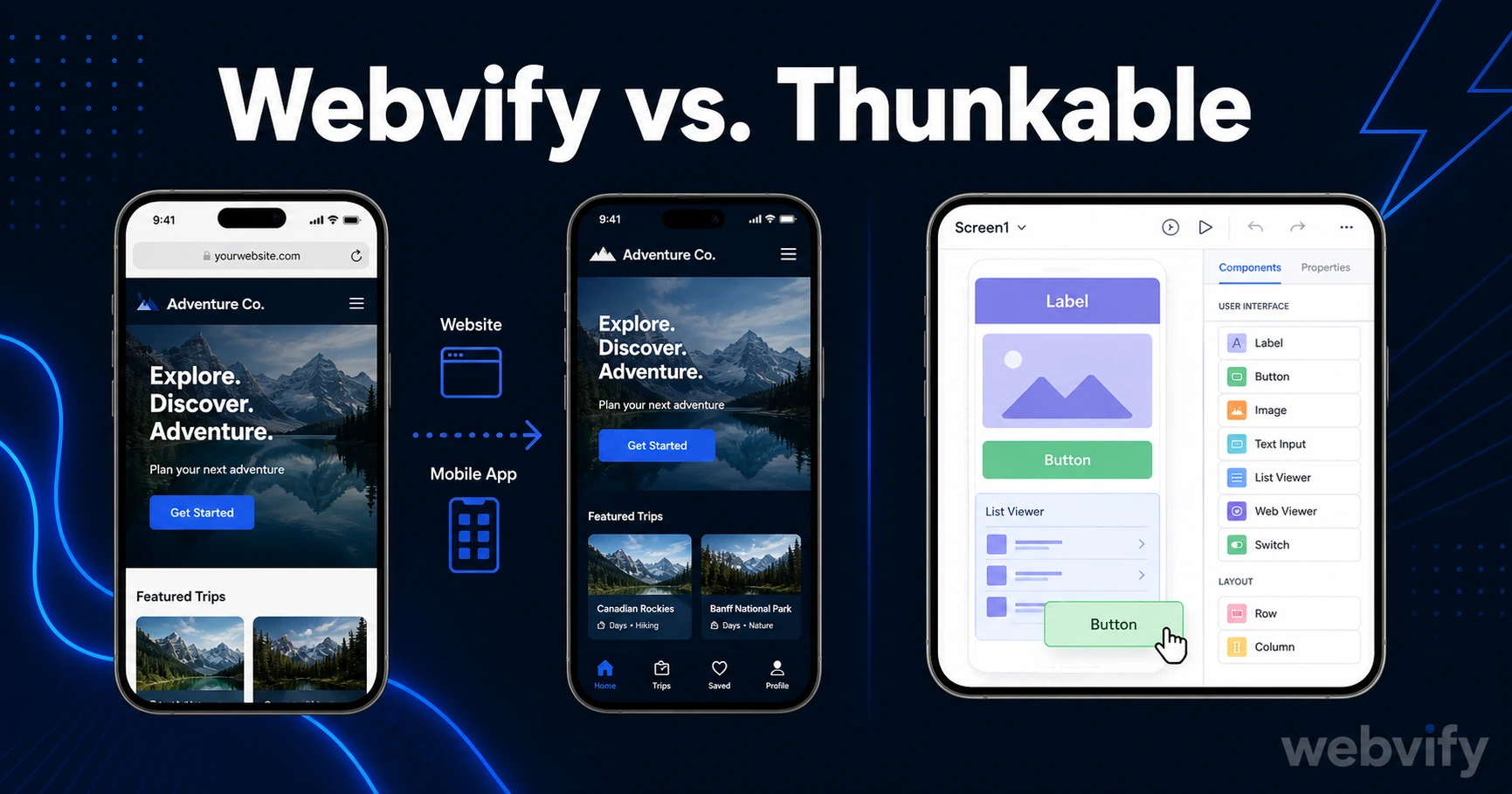
Webvify converts your existing website into a mobile app. Thunkable builds apps from scratch. Here's how to decide which one actually fits your situation.
Inside this article
Most business owners comparing app builders ask the wrong question. They want to know which tool has more features — when the real question is whether they're starting from zero or already have a website.
That distinction is the entire difference between Webvify and Thunkable. If you already run a live website, this comparison will save you a lot of wasted time and rebuilding work.
What Webvify and Thunkable Actually Do
Both Webvify and Thunkable are often grouped under the "no-code app builder" label, but they solve different problems for different starting points.
Webvify converts your existing website into a mobile app. If you run a WordPress site, a Shopify store, a Webflow portfolio, or any other live website, Webvify wraps it inside a native mobile app shell and submits it to the App Store and Google Play — under your own developer accounts, with your own branding. Your website becomes the app. Nothing gets rebuilt.
Thunkable is a visual drag-and-drop app builder. You start with a blank canvas, add screens, connect data sources, and design the app interface from scratch inside the Thunkable editor. There's no coding required, but there's also no shortcut for existing websites — the content has to be entered into Thunkable's platform regardless of what you already have live online.
These are fundamentally different tools aimed at fundamentally different starting points.
Webvify vs. Thunkable: The Core Differences
Starting point. The most important difference is what each tool requires on day one. Webvify works because your website already exists — it becomes the source of truth, and Webvify wraps it as a mobile experience. Thunkable requires you to build the app interface from scratch inside their platform, regardless of whether you already have a working website.
App Store submission. Getting your app onto the App Store and Google Play involves more than the build itself. You need Apple and Google developer accounts, prepared screenshots, app descriptions, and navigation through review guidelines. Webvify handles this end-to-end as part of the service. Thunkable delivers the build files and leaves submission entirely to you.
Maintenance after launch. With Webvify, your website and app stay in sync automatically. You update your website, and the app reflects those changes — because the app is your website. With Thunkable, you maintain two separate systems. Any change to your product, prices, or content needs to happen in both places independently.
Backend and data. Thunkable connects to external databases — Google Sheets, Airtable, Firebase — to power dynamic content. This gives flexibility for building apps that don't exist as websites. For most small businesses, though, the content is already live on their site. Rebuilding it in a separate data source adds complexity without adding value.
When Webvify Is the Right Choice
Webvify is the right choice when you already have a working website and want to extend it to mobile without rebuilding it.
Small business owners with a WordPress, Shopify, or Wix site who want an App Store presence benefit most. The app reflects the website automatically, so there's nothing new to maintain. Push notifications — one of the highest-ROI tools for customer retention — become available immediately once the app is live.
E-commerce stores looking to increase mobile conversion rates are a natural fit. Mobile web converts at roughly half the rate of a dedicated mobile app. Webvify closes that gap by turning an existing Shopify or WooCommerce storefront into an app without a rebuild.
Web developers and agencies who want to offer mobile apps as an upsell without learning mobile development can use Webvify to add app delivery to their service list. If you build client websites, a Webvify-powered app can be offered as an additional deliverable without touching Xcode or Android Studio. (See our full guide to offering mobile apps to web design clients.)
Services like Webvify handle the packaging, submission, and post-launch admin panel setup — so you don't need to navigate Apple's developer portal or respond to review feedback yourself.
If your website is already doing the work, there's no reason to rebuild it in a separate platform.
When Thunkable Is the Right Choice
Thunkable is better suited for situations where you're building something genuinely new — not converting an existing website.
If you need a custom standalone app with logic that doesn't map to a website — a workflow tool, a calculation app, an internal company directory — Thunkable gives you the visual building blocks to construct those screens without code.
It also works well as a learning environment. If you're a student or developer experimenting with app logic for the first time, Thunkable's drag-and-drop interface makes it easier to understand how apps are structured.
But for business owners who already have a website and want an app, Thunkable creates a rebuild problem: you'd be re-entering content that already exists, into a second platform you then have to maintain separately going forward.
Pricing: What You Actually Pay
Thunkable offers a free tier for basic projects and paid plans starting around $39/month. App Store submission and developer account setup remain the user's responsibility at every pricing tier. Apple's developer account costs $99/year; Google Play is a one-time $25 fee — neither is included in Thunkable's pricing.
Webvify works on a done-for-you model rather than a recurring monthly subscription. The service covers the app build, App Store submission, Google Play submission, and an admin panel for managing the app after launch. There's no ongoing platform fee tied to keeping the app live.
For a full breakdown of what no-code app builders actually cost — including the fees most pricing pages leave out — see the no-code mobile app pricing comparison for 2026.
How to Decide
The decision comes down to one question: do you already have a website?
Choose Webvify if:
- You have a live website and want it on the App Store without rebuilding it
- You want App Store and Google Play submission handled for you
- You don't want to maintain a second content system alongside your website
- You need push notifications and home screen presence for your existing audience
Choose Thunkable if:
- You're building something new that doesn't exist as a website yet
- You need custom app screens and logic a web interface can't deliver
- You're learning app development and want a visual sandbox to experiment in
Most small business owners and web agencies fall into the first category. The website is already live. The goal is a mobile app presence — not a rebuild project.
Frequently Asked Questions
Is Thunkable a good alternative to Webvify?
Only if you're building a brand-new app with no existing website. If you already have a live website, Thunkable requires rebuilding your content inside their editor, creating a duplicate system you have to maintain in parallel. Webvify converts the website you already have directly into a mobile app — there's nothing to rebuild.
Does Webvify work with any website platform?
Webvify works with any website that runs on a public URL, including WordPress, Shopify, Wix, Webflow, WooCommerce, Squarespace, and custom-built sites. The app loads your existing website inside a native mobile shell, so compatibility depends on how well your site already renders on mobile browsers.
Who handles App Store submission with Webvify vs. Thunkable?
Webvify includes App Store and Google Play submission as part of the service — handled end-to-end on your behalf. With Thunkable, you receive the app build file and manage submission yourself, including setting up developer accounts, writing store listings, and resolving any review feedback from Apple or Google.
If you already have a website and want it live on the App Store and Google Play without rebuilding it or managing the submission process yourself, Webvify handles everything end-to-end.